

STRATEGY
With the strategic model we define multiple algorithms and let the client application pass the algorithm to use as a parameter. Depending on the different interface implementations, the objects execute the method in different ways. For our case we have various reports that give different results and different searches depending on the type and we will try to implement different strategies for the search and the report in csv format based on the type we pass. First of all we will create the interface for the strategy pattern, in our case to create the report we create IReportServiceStrategy.java
Implementing the Strategy Pattern in Spring
Let’s illustrate the Strategy pattern with the following figure.
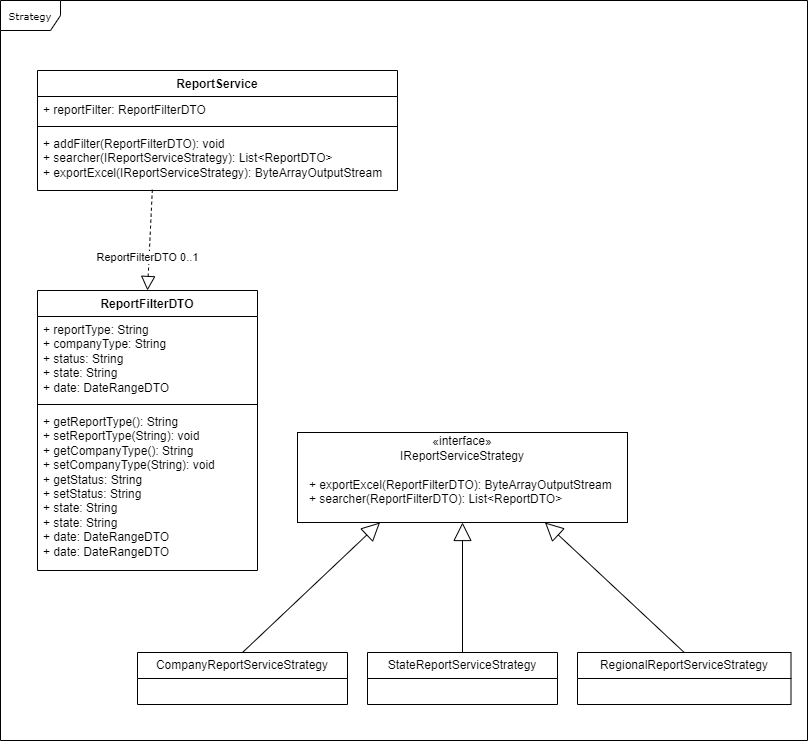
Step 1: Create the Interface
public interface IReportServiceStrategy {
   ByteArrayOutputStream exportExcel (ReportFilterDTO filter);
   List<ReportDTO> searcher (ReportFilterDTO filter);
}
Step 2: Create the Strategy Class
@Service("companyReportServiceStrategy")
public class CompanyReportServiceStrategy implements IReportServiceStrategy {

   @Override
   public ByteArrayOutputStream exportExcel(ReportFilterDTO filter) {
      System.out.println("Call exportExcel of CompanyReportServiceStrategy");
      return null;
   }

   @Override
   public List<ReportDTO> searcher(ReportFilterDTO filter) {
      System.out.println("Call searcher of CompanyReportServiceStrategy");
      return null;
   }
}

@Service("regionalReportServiceStrategy")
public class RegionalReportServiceStrategy implements IReportServiceStrategy {

   @Override
   public ByteArrayOutputStream exportExcel(ReportFilterDTO filter) {
      System.out.println("Call exportExcel of RegionalReportServiceStrategy");
      return null;
   }

   @Override
   public List<ReportDTO> searcher(ReportFilterDTO filter) {
      System.out.println("Call searcher of RegionalReportServiceStrategy");
      return null;
   }
}
Step 3: Create the Service
@Service
public class ReportService {

private ReportFilterDTO reportFilter;

public void addFilter(ReportFilterDTO reportFilter){
   this.reportFilter = reportFilter;
}

public List<ReportDTO> searcher(IReportServiceStrategy reportServiceStrategy){
   return reportServiceStrategy.searcher(this.reportFilter);
}

public ByteArrayOutputStream exportExcel(IReportServiceStrategy  reportServiceStrategy){
    return reportServiceStrategy.exportExcel(this.reportFilter);
   }
}
Step 4: Using the Strategy
@SpringBootApplication
public class DemoApplication implements CommandLineRunner {

   @Autowired
   private ReportService reportService;

   @Autowired
   @Qualifier("companyReportServiceStrategy")
   private IReportServiceStrategy companyReportServiceStrategy;

   @Autowired
   @Qualifier("regionalReportServiceStrategy")
   private IReportServiceStrategy regionalReportServiceStrategy;

   @Autowired
   @Qualifier("stateReportServiceStrategy")
   private IReportServiceStrategy stateReportServiceStrategy;

   public static void main(String[] args) {
      SpringApplication.run(DemoApplication.class, args);
   }

   @Override
   public void run(String... args) throws Exception {
      //Strategy
      ReportFilterDTO reportFilterDTO = new ReportFilterDTO();
      reportFilterDTO.setState("State");
      reportFilterDTO.setCompanyType("Company");
      reportFilterDTO.setStatus("Status");
      reportService.addFilter(reportFilterDTO);
      System.out.println("Report call function search");
      reportService.searcher(companyReportServiceStrategy);
      reportService.searcher(regionalReportServiceStrategy);
      reportService.searcher(stateReportServiceStrategy);
      System.out.println("");
   }
}
Conclusion
Strategy pattern is useful when we have multiple algorithms for a specific task and we want our application to be flexible to choose any of the algorithms at runtime for a specific task. Here you can found code example.









You may also like



About Post Author